Essential vs advanced tracking
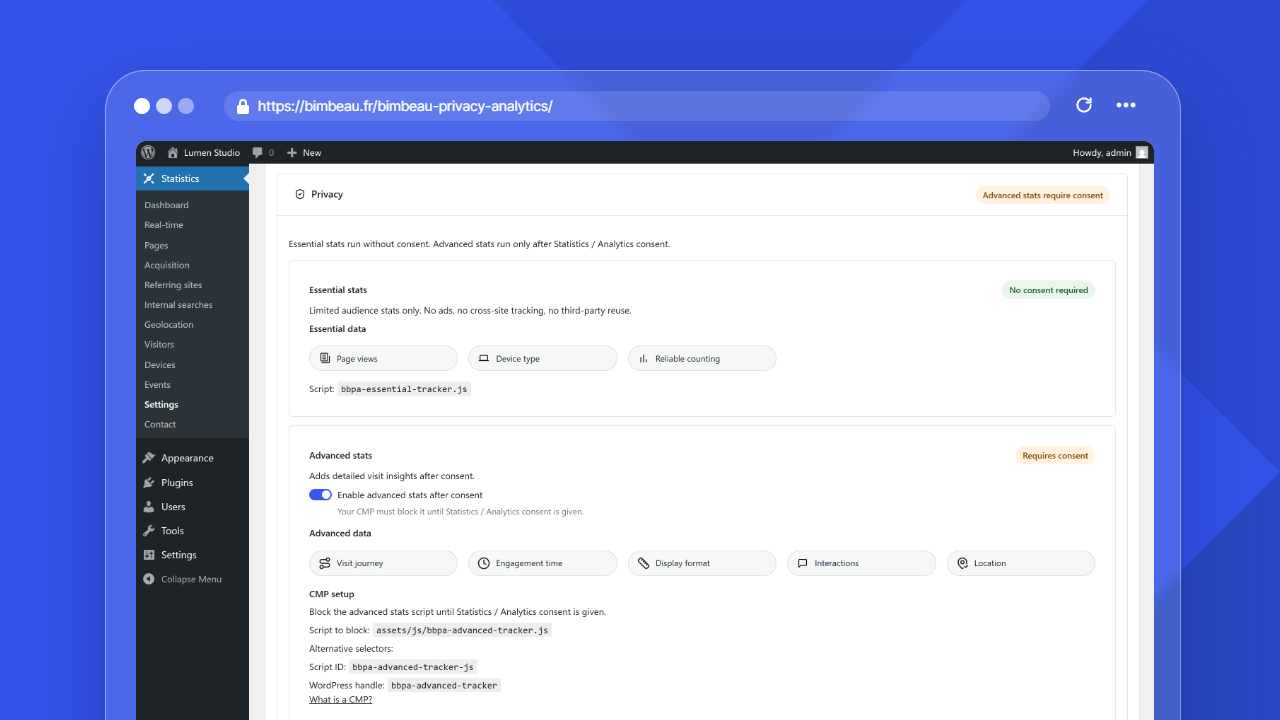
BimBeau Privacy Analytics separates analytics collection into two levels: essential tracking and advanced tracking.
This separation helps you keep core website statistics available while controlling which richer analytics signals are collected, depending on your settings and consent workflow.
Good to know
This page explains the concept from a user perspective. It does not replace legal advice or your website privacy policy.
Why BimBeau Privacy Analytics uses two tracking levels
Many website owners need basic analytics to understand website activity, but not every analytics signal has the same privacy impact or consent requirement.
BimBeau Privacy Analytics is designed around this distinction:
Essential tracking provides baseline aggregate analytics with minimal collection. It is designed to keep core reports available, such as page views, visits, Pages, Acquisition, Referring sites, Internal searches, Pages not found, and basic activity trends.
Advanced tracking can add richer analytics signals when enabled and allowed by your consent workflow. These signals may support deeper reporting, engagement analysis, visitor-level enrichment, geolocation enrichment, event-related features, and Pro workflows where available.
Essential tracking
Essential tracking is the baseline analytics layer in BimBeau Privacy Analytics.
It focuses on aggregate website measurement and helps answer everyday analytics questions:
- how many page views did the site receive?
- how many visits happened during a period?
- which pages are most viewed?
- which referrers send traffic?
- which searches and 404 errors appear?
Each real page reload counts as a page view. BimBeau Privacy Analytics keeps replay protection focused on duplicate transport submissions, so a network retry for the same hit does not inflate page-view totals.
Essential tracking may temporarily store first-party technical data in the visitor's browser with localStorage or sessionStorage. The temporary visit identifier helps group activity into the same bounded visitor row, prevent technical duplicate hits, and produce aggregated or anonymized audience statistics. It is not used for advertising, cross-site tracking, or visitor profiling.
By default, the temporary Essential visit identifier expires after 30 minutes. The Visitor activity window setting controls this duration from 5 minutes to 24 hours. After inactivity exceeds the window, the tracker starts a new visitor row for new activity.
Essential tracking is intended to keep reporting useful without collecting unnecessary detail.
Expected result
For many websites, essential tracking is enough to understand general traffic trends and maintain a lightweight analytics workflow inside WordPress.
Advanced tracking
Advanced tracking is the enrichment layer in BimBeau Privacy Analytics.
Depending on your edition, settings, and consent workflow, advanced tracking can support deeper insights such as:
- active engagement timing;
- richer visitor details;
- enhanced device or browser dimensions;
- geolocation enrichment;
- event tracking;
- page-level analysis;
- Pro reporting workflows.
Advanced tracking should be configured carefully, especially if your jurisdiction or privacy policy requires user consent before collecting analytics enrichment data.
Important
Advanced tracking may require consent depending on your website, audience, jurisdiction, and configuration. You are responsible for deciding when consent is required and configuring your consent tools accordingly.
How consent fits in
BimBeau Privacy Analytics does not replace a consent management platform.
If your website requires consent for advanced analytics, your CMP or consent banner should control whether the advanced BimBeau Privacy Analytics tracker is allowed to run.
A typical setup looks like this:
-
Essential analytics remain available
BimBeau Privacy Analytics can keep essential aggregate reporting available according to your configuration.
-
Your CMP asks for analytics consent
Your consent banner or CMP presents the appropriate analytics consent choice to the visitor.
-
Advanced tracking runs only when allowed
If the visitor grants the required consent, your CMP can allow the advanced BimBeau Privacy Analytics tracker to run.
-
Enriched reports become more complete
When advanced tracking is enabled and allowed, BimBeau Privacy Analytics can collect richer analytics signals where available.
What happens when advanced tracking is disabled
When advanced tracking is disabled or blocked, BimBeau Privacy Analytics can still provide essential analytics. Two situations behave differently.
When the advanced stats setting is off
When Enable advanced stats after consent is off in Settings → Tracking & privacy, the reports that rely on advanced data are hidden from the admin menu and the dashboard navigation:
| Hidden report | Why |
|---|---|
| Geolocation | Location data comes from the advanced tracker |
| Visitors | Visitor journeys and enriched visit details come from the advanced tracker |
| Devices | Browser, operating system and display details come from the advanced tracker |
| Real-time | Live activity relies on advanced visit data |
| Events (Pro) | Captured events come from the advanced tracker |
The essential reports (Dashboard, Pages, Acquisition, Referring sites, Internal searches, Pages not found) stay available. The hidden reports come back as soon as the setting is turned on again.
When the setting is on but a visitor has not consented
When advanced stats are enabled but your CMP blocks the advanced tracker for a visitor, the reports stay visible, but some enriched fields or values may be limited, private, unavailable, or less detailed:
| Area | Possible behavior when advanced tracking is unavailable for a visit |
|---|---|
| Visitors | Some enriched visitor dimensions may be private or unavailable |
| Active time | Engagement timing may be limited or missing |
| Geolocation | Some enriched location details may be unavailable |
| Events | Pro event tracking may not run without the required configuration |
| Page details | Some deeper Pro analysis may be unavailable or incomplete |
Good to know
Limited data is not always an error. It can be the expected result of privacy settings, consent choices, or technical availability.
Choosing the right setup
The best setup depends on your website and privacy requirements.
Use essential tracking as your main analytics layer. Keep advanced tracking disabled or tightly controlled if you only need aggregate website statistics.
Use essential tracking for baseline reports, then allow advanced tracking only after the required analytics consent is granted through your CMP.
Enable advanced tracking and Pro features when you need richer reporting, event tracking, exports, and page-level insights, while keeping your consent workflow aligned with your privacy policy.
Practical examples
Basic blog or small website
A small website may only need essential tracking to understand views, visits, Pages, Acquisition, Referring sites, Internal searches, and Pages not found.
Marketing website
A marketing website may use essential tracking for baseline analytics and advanced tracking after consent to better understand engagement and campaign behavior.
Professional reporting workflow
A team using BimBeau Privacy Analytics Pro may combine essential analytics, consent-based advanced tracking, exports, event tracking, and page details for deeper analysis.
Common questions
Does BimBeau Privacy Analytics replace my CMP?
No. BimBeau Privacy Analytics provides analytics controls and separates essential and advanced tracking, but it does not replace your CMP, cookie banner, privacy policy, or legal compliance process.Why are some visitor fields private or unavailable?
This can happen when only essential data is available, when advanced tracking is disabled, when consent has not been granted, or when the required technical signal is missing.Can I use BimBeau Privacy Analytics without advanced tracking?
Yes. BimBeau Privacy Analytics can still provide essential aggregate analytics without relying on advanced tracking.Next step
Continue with Consent and CMP setup to learn how BimBeau Privacy Analytics fits into your consent workflow.