Referring sites
The listing uses a fluid, bounded report area. Referrer domains remain complete up to 100 characters; longer visible values use an ellipsis while their full values remain available for search, sorting, exports, and accessible labels. Hover or focus a shortened referrer to access its complete value.
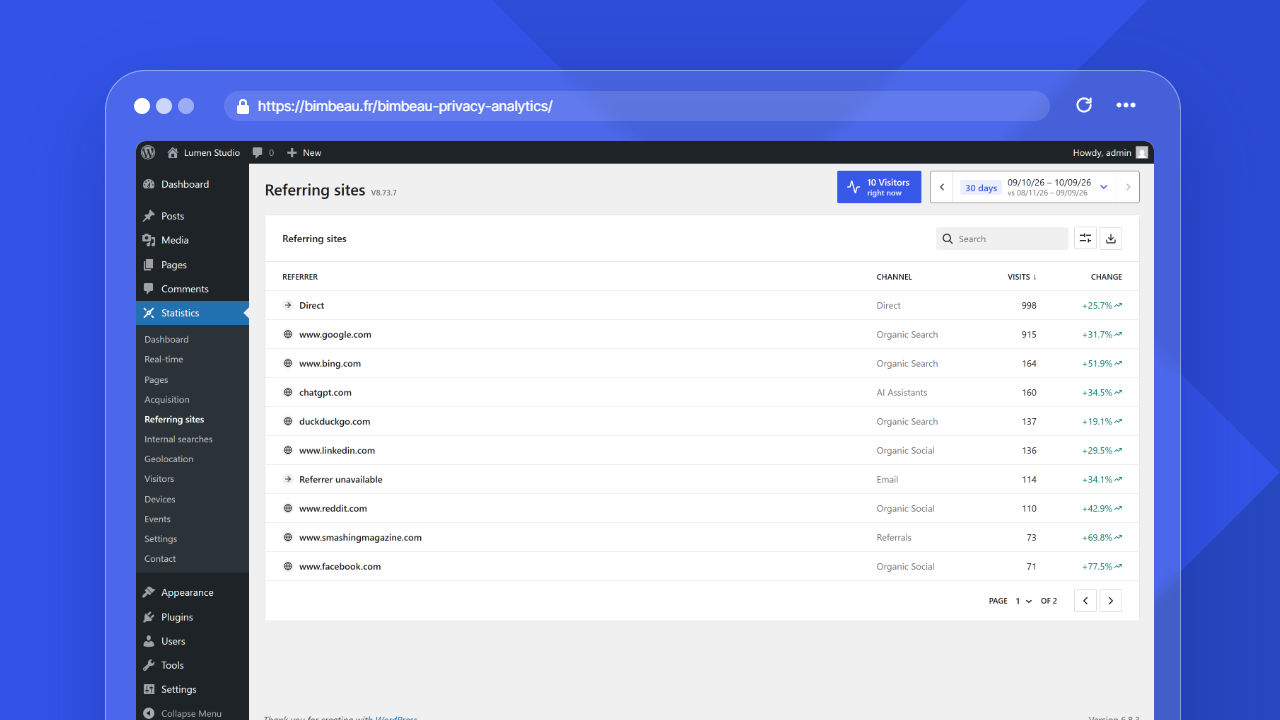
The Referring sites report helps you understand where visitors come from before reaching your WordPress website.
Use this report to identify traffic sources, evaluate promotion channels, monitor external links, and understand which websites or platforms send visitors to your content.
Good to know
Referrer data depends on what browsers, websites, search engines, and privacy tools allow to be shared. Some visits may not include a visible referrer.
Open the Referring sites report
In your WordPress admin area, go to Statistics → Referring sites.
The Top referrers card of the Dashboard also lists the sites that send the most visits.
What this report helps you understand
Use Referring sites to answer questions such as:
- Which websites send traffic to my site?
- Are visitors coming from search engines, social platforms, newsletters, or partner websites?
- Which external mentions generate visits?
- Is a campaign or publication driving traffic?
- Are there unexpected or low-quality traffic sources?
Referring sites vs traffic sources
Referrers and traffic sources are related, but they are not always the same thing.
A referrer is usually the domain or website that linked to your website before the visitor arrived.
A traffic source is a broader category or interpretation of where the visit came from, such as direct, search, social, referral, or campaign traffic when available.
For example, a visit from a search engine may appear as a specific referrer domain and may also be grouped as search traffic.
Main columns
The Referring sites report is based on referrer information when available. The current table shows these columns.
| Column | What it means |
|---|---|
| Referrer | The detected referring domain, with its icon, or Direct for visits without a referrer |
| Channel | The acquisition channel assigned to the row, such as Direct, Organic Search, or Referrals |
| Visits | The number of visits associated with that referrer during the selected period |
| Change | The change in visits compared with the previous period, or New for a referrer without visits in that period |
List controls
The list uses the WordPress list component (DataViews), the one of the Pages and Templates screens: the search field is at the top left, and, in Pro, the export button sits at the top right next to the View options button (cog icon). Click the Referrer, Channel or Visits column header to sort in ascending or descending order, or use View options, which also holds the density (compact by default; the choice applies to every list and is kept for your account in this browser), Items per page (5, 10, 20, 50 or 100) and Columns, where the Channel column can be hidden. Sorting runs on the server, so it covers every row of the period. When the results span more than one page, the page selector and the previous and next page arrows appear under the table, next to the item count.
Channels
The Channel column uses the same acquisition channels as the Acquisition report: Direct, Organic Search, Paid Search, Referrals, Paid Social, Organic Social, Email, Other Campaigns, AI Assistants, and Other. See the Acquisition report for the rule behind each channel.
Direct means that the visitor arrived without a visible referrer, for example from a typed URL, bookmark, app, email client, or privacy-restricted context.
Good to know
Direct traffic does not always mean someone typed the URL manually. It can also happen when the original source is hidden or stripped by the browser, application, or privacy settings.
How to interpret referrer data
Referrer data is most useful when you look for patterns over time.
For example:
- a new external domain may indicate a recent mention or backlink;
- a spike from a social platform may correspond to a post or campaign;
- steady search traffic may indicate strong organic visibility;
- high traffic from a partner website may reveal a valuable referral channel;
- unexpected domains may deserve a quality check.
Date range
Use the date range controls to focus on a specific period.
Short ranges are useful for campaigns, announcements, and recent publications. Longer ranges help you identify stable acquisition channels.
Privacy and missing referrers
Some visits may have no visible referrer.
This can happen for several reasons:
- the visitor opened the site directly;
- the source application did not pass referrer information;
- the browser restricted referrer data;
- the referring website used a strict referrer policy;
- privacy tools removed or limited the information.
Important
Do not treat referrer data as a complete acquisition attribution system. It is a useful traffic signal, but it may be incomplete by design.
Free and Pro behavior
BimBeau Privacy Analytics Free includes referrer and traffic source reporting for aggregate website analytics.
BimBeau Privacy Analytics Pro adds export workflows for supported reports while keeping the same core Referring sites reporting foundation.
Exporting referrer data
Exports are a Pro feature.
When export actions are available, you can download referrer data for external reporting, marketing analysis, or archiving.
Important
Exported analytics files may contain website activity data. Store and share exports according to your privacy policy and internal data handling rules.
Empty or unexpected results
If the Referring sites report is empty or does not show the source you expect, check the following:
-
Check the selected date range
The referrer may have sent traffic outside the current reporting period.
-
Confirm that the visit came from a link
If you open a page directly, from a bookmark, or from some apps, the visit may appear as direct traffic instead of a visible referrer.
-
Review privacy restrictions
The original website, browser, app, or privacy tool may have removed referrer information before the visit reached your site.
-
Generate a controlled test
Click a link to your website from another public page, then check the report after BimBeau Privacy Analytics has recorded the visit.
Optional referrer favicons
Referrer favicons are visual only. They remain disabled until an administrator enables them in the first configuration assistant or General settings. While disabled, the report displays a local generic icon and does not contact a referrer domain. When enabled, retrieval occurs server-side, discovers icons from page declarations, Web App Manifests, and common root paths, accepts only signature-validated ICO, PNG, JPEG, WebP, GIF, or strictly sanitized static SVG files, and the report receives only a locally cached URL. Safe static SVG presentation data is retained while unsupported passive metadata is removed; scripts, event handlers, active content, external resources, and unsafe URLs are rejected. A successfully resolved local file is reused across report pages and full reloads without another external request while it exists and remains readable. Disable the setting at any time to stop new retrieval requests.
Next step
Continue with Internal searches to understand what visitors search for on your website.