Real-time
The real-time visitor listing keeps complete current-page values in the document and confines long, unbroken URLs to the available column width. Hover or focus a current-page label to access its complete value.
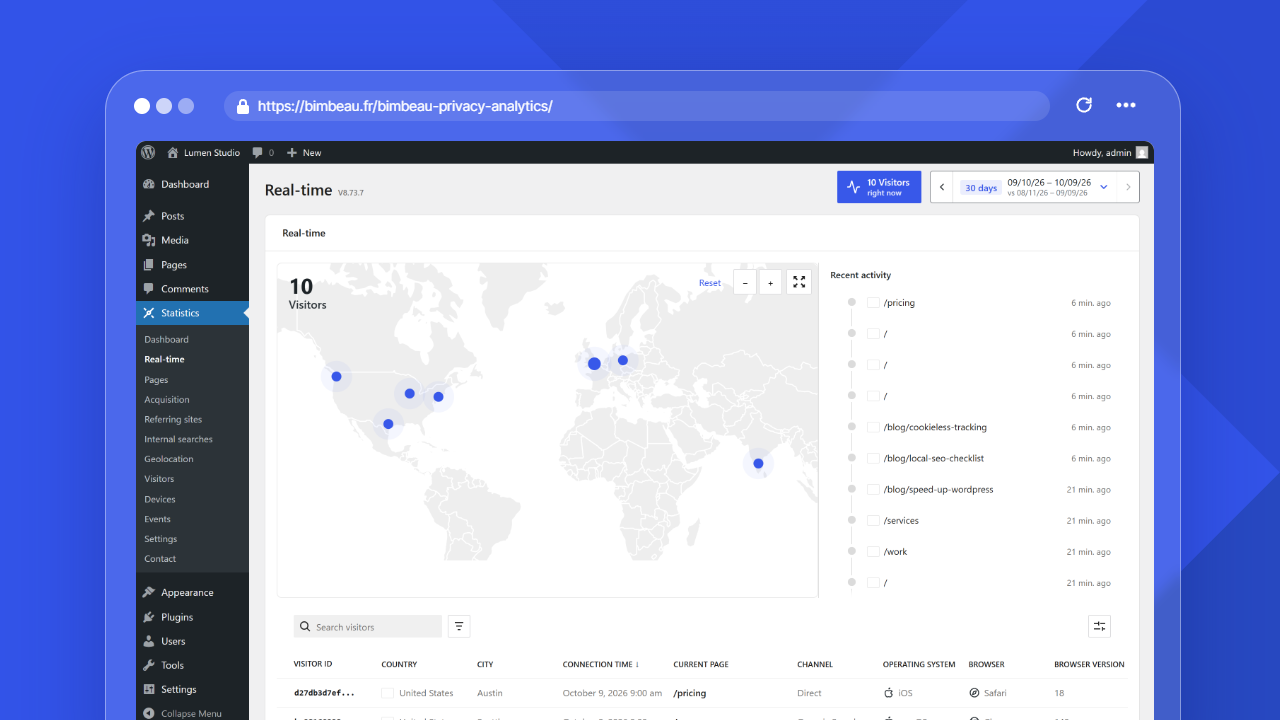
The Real-time report helps you monitor recent and currently active activity on your WordPress website.
Use this report to confirm that BimBeau Privacy Analytics is recording traffic, observe activity after publishing or promoting content, and follow short-term visitor movement.
Good to know
Real-time reporting is available in BimBeau Privacy Analytics Free and BimBeau Privacy Analytics Pro.
Open the Real-time report
In your WordPress admin area, go to Statistics → Real-time.
Good to know
The Real-time report depends on advanced statistics. When Enable advanced stats after consent is turned off in the Tracking and privacy settings, the Real-time report is hidden from the Statistics menu.
What this report helps you understand
Use Real-time to answer questions such as:
- Is BimBeau Privacy Analytics recording visits right now?
- Are visitors active after a publication, campaign, or email send?
- Which pages are currently attracting attention?
- Where are recent visitors coming from?
- Are there active visitors from specific countries or cities?
- Is recent traffic coming from people? Real-time leaves bot traffic out, like the visitor totals; the Robots tab of the Visitors report lists it.
How real-time data works
Real-time data focuses on recent activity rather than long-term trends.
It is useful for immediate monitoring, but it should be interpreted differently from historical reports such as Pages, Referring sites, or Devices.
Real-time helps you see what is happening now or very recently. It is best for quick checks, launches, and short-term monitoring.
Historical reports help you analyze traffic over a selected date range. They are better for trends, decisions, reporting, and comparison.
What the Real-time screen shows
The Real-time card contains:
| Element | What it shows |
|---|---|
| Visitor counter | The number of active visitors, in the top left corner of the map. It follows the same active window as the rows of the visits table. |
| Map | Where the active visitors are: a country choropleth in Free, precise markers in Pro when enriched coordinates are permitted and available (see below). |
| Map controls | Reset on the left, then zoom out, zoom in and Fullscreen. Fullscreen is useful on a monitoring screen; select Exit fullscreen to leave. |
| Recent activity | A compact timeline next to the map, latest page view first: one line per visitor with the country flag, the page and the time elapsed since the last page view (for example "2 min. ago"). Hovering or focusing a line highlights that visitor's marker on the map. The timeline is hidden when no visitor is active, in essential-only collection and in fullscreen. |
| Visits table | One row per active visitor, most recent connection first, with the columns Visitor ID hash, Country, City (Pro), Connection time, Current page, Channel, Operating system, Browser, Browser version, Device, and Resolution. The columns after Current page appear when the collection context permits them. |
The card can also show these notices:
- Visitor origin unavailable: countries cannot be resolved until the local GeoIP database is installed from the geolocation settings;
- Essential-only scope: enriched visit details and precise map markers are unavailable.: only essential data is collected, so the table and the map stay limited;
- No visits in the current activity window.: no visitor is active right now;
- Fullscreen is unavailable in this browser context.: the browser does not allow the fullscreen mode.
The map adapts to the edition and the location data available:
- Free displays a country choropleth. Countries are shaded according to recent visitor activity, without precise geographic markers.
- Pro displays precise markers when the real-time snapshot contains valid enriched coordinates. If coordinates are missing, invalid, or unavailable under essential-only collection, the map automatically falls back to the country choropleth.
Each marker is a point with a soft halo. A visitor whose last page view is less than a minute old sends out a wave; the point then fades as the last page view gets older, so recent activity stands out. Markers do not move when the system asks to reduce motion.
When markers are displayed, the map automatically centers and zooms on the active visitors and follows them as visitors arrive or leave. Zooming or dragging the map yourself pauses this automatic framing; select Reset to resume it.
The map remains visible with a neutral country view when no visitors are active or location data is still being refreshed. The Real-time panel does not present an empty-map prompt to change geolocation settings.
The visitor table follows the same privacy boundary. Free does not display the City column, while the country remains available when it can be determined. Every active visitor has a row: when the country cannot be determined (for example before the local GeoIP database is installed, or for a private IP address), the row shows Unknown country. Pro can display the City column when the collection context permits city data. A Pro map therefore does not always contain markers.
The visitor table uses the WordPress list component (DataViews), like the other lists of the plugin. It refreshes with the report and lists the most recent connections first. Search the visitor hash, country, city, page, operating system or browser, filter by Country, Channel or Device among the visits on screen, sort from the column headers, and use View options (cog icon) for the density (compact by default; the choice applies to every list and is kept for your account in this browser), the items per page (5 to 100) and the visible columns.
Automatic refresh
The Real-time report refreshes on its own: every 5 seconds while its browser tab is visible, and every 15 seconds while the tab is in the background. After a loading error, the next attempts are spaced out progressively. You do not need to reload the page.
When advanced statistics and the Real-time report are enabled, the number of active visitors is also shown outside this report:
- in the header of every report screen, as a button that opens Real-time;
- in the Statistics menu of the WordPress admin, as a badge next to Real-time when at least one visitor is active. The badge is calculated when an admin page loads.
When to use Real-time
Real-time is especially useful when you want to:
- verify tracking after installation;
- test a public page visit;
- monitor traffic after publishing a new article;
- observe activity during a campaign launch;
- check whether a newsletter or social post is sending visitors;
- detect sudden short-term traffic spikes.
Testing BimBeau Privacy Analytics with Real-time
Use this simple workflow after installing or configuring BimBeau Privacy Analytics.
-
Open a public page
Visit a public frontend page of your website in a browser.
-
Return to WordPress admin
Open Statistics → Real-time.
-
Watch the report
Wait a few seconds: the report updates automatically, without reloading the page.
-
Compare with your settings
If no activity appears, review your tracking settings, role exclusions, and consent configuration.
Low-traffic websites
On low-traffic websites, Real-time may often look empty. This does not always mean tracking is broken.
Real-time depends on recent activity. If no one has visited the site recently, there may be nothing to display.
Good to know
For low-traffic websites, generate a controlled test visit from a public page before using Real-time to verify installation.
Privacy and consent behavior
Real-time follows the same privacy and tracking behavior configured for BimBeau Privacy Analytics.
Essential activity can provide basic aggregate visibility. Advanced or enriched details may depend on your settings and consent workflow.
Important
BimBeau Privacy Analytics is not a consent management platform. If consent is required for advanced analytics on your website, make sure your CMP controls the relevant tracking behavior.
Free and Pro behavior
BimBeau Privacy Analytics Free includes the Real-time report. Its map is a country choropleth: countries are shaded according to recent activity, and no precise geographic markers appear. The visitor table omits the City column but retains the country when it can be determined.
BimBeau Privacy Analytics Pro displays precise map markers only when valid enriched coordinates are available. Its visitor table can include the City column when the collection context permits that data. Missing or invalid coordinates—and essential-only collection that does not provide them—make the map fall back automatically to the country choropleth.
Empty or unexpected results
If the Real-time report is empty or does not show the activity you expect, check the following:
-
Confirm recent traffic
Real-time only shows recent activity. If your site has no recent visitors, the report may be empty.
-
Visit a public frontend page
Open a normal public page, not a WordPress admin screen or technical endpoint.
-
Check role exclusions
If your WordPress role is excluded from tracking, your own test visit may not appear.
-
Review consent behavior
If advanced tracking is blocked by your CMP, enriched real-time details may be unavailable.
-
Compare with historical reports
Open the Dashboard or Pages report to confirm whether BimBeau Privacy Analytics is recording traffic generally.
Next step
Continue with Visitors to understand visitor-level reporting and available detail levels.