Geolocation settings
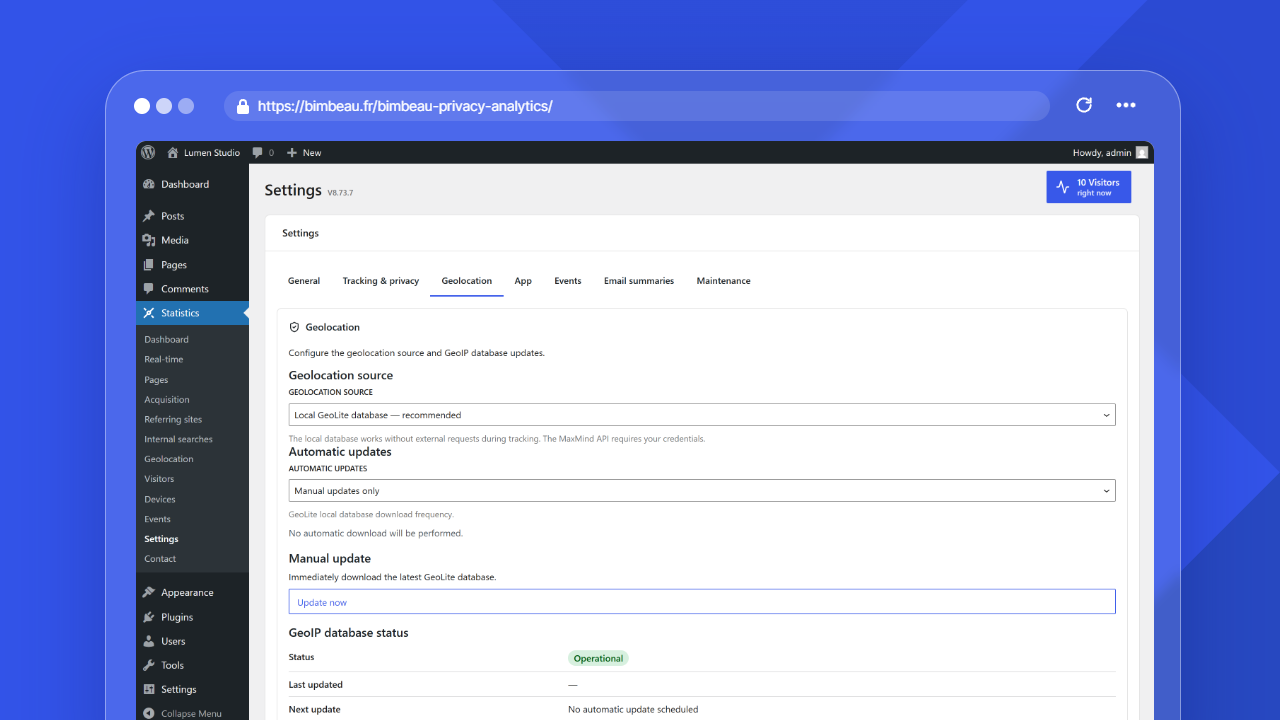
Geolocation settings control how BimBeau Privacy Analytics resolves country and city information for geolocation reports.
Good to know
Geolocation is useful for aggregated audience trends. It is not an exact personal location tool and should not be used as a precise identity or location signal.
Where to find geolocation settings
In the WordPress admin area, open Statistics → Settings → Geolocation.
Geolocation source
The Geolocation source setting lets you choose how BimBeau Privacy Analytics resolves locations.
| Source | What it means |
|---|---|
| Local GeoLite database — recommended | Uses a local GeoLite MMDB database downloaded through the official BimBeau GeoIP Database Service manifest. This is the default mode in the settings interface. |
| MaxMind API | Uses live MaxMind API requests with your MaxMind Account ID and License Key. |
Local GeoLite database
Local database mode uses a GeoLite database stored in this WordPress installation for geolocation resolution. Country and city reports require installing the local GeoIP database from Geolocation settings. Local lookups do not send visitor IP addresses to BimBeau.
Use Update now for the first installation, when a previously installed database is missing or unreadable, or to refresh an operational database. When an administrator installs or updates the database, BimBeau Privacy Analytics contacts the official BimBeau GeoIP Database Service to fetch the manifest and database archive, verifies its SHA-256 checksum, decompresses the MMDB file, and replaces the local file only after validation succeeds.
Database storage and server requirements
The database is stored in wp-content/uploads/bbpa/geoip/. BimBeau Privacy Analytics adds .htaccess and index.php files to this directory so the database cannot be downloaded from the website on Apache and LiteSpeed servers. On nginx, add a rule that denies access to the private directories, for example:
The download is decompressed in small chunks, so the update does not need a large PHP memory limit. PHP must be able to write to the uploads directory directly. If WordPress is configured to write files through FTP or SSH (FS_METHOD), the update stops before downloading and explains how to fix the configuration: make the uploads directory writable by PHP, or define FS_METHOD as direct in wp-config.php.
GeoLite2 attribution
This product includes GeoLite2 data created by MaxMind, available from https://www.maxmind.com. The GeoLite2 data is subject to the GeoLite2 End User License Agreement.
Automatic database updates
The Automatic updates setting uses Manual updates only by default. Administrators can update the database manually or explicitly choose an automatic update frequency. In manual-only mode, the plugin does not schedule GeoIP database downloads, retries, or manifest requests.
Available frequencies:
- Manual updates only;
- Every 15 days;
- Every 30 days;
- Every 45 days;
- Every 60 days;
- Every 3 months;
- Every 6 months;
- Every year;
- Every 2 years.
Update now
The Manual update section has a single Update now button. Use it to request an immediate local GeoIP database install or update. This is useful during first setup, after correcting a failed update condition, or when you want to refresh the database before the next scheduled check.
Database status fields
When local database mode is active, the GeoIP database status section shows:
| Field | What it tells you |
|---|---|
| Status | The current local database state: Operational, Update in progress, Error during last update, or Unavailable |
| Last updated | When the database was last updated successfully |
| Next update | When the next automatic GeoIP database update is planned, or that no automatic update is scheduled |
| Size | The local database file size |
The collapsible Technical details section adds:
| Field | What it tells you |
|---|---|
| Last attempt | When BimBeau Privacy Analytics last tried to update the database |
| Retry count | The number of retry attempts currently recorded |
| Source or service | The service the database is downloaded from (BimBeau GeoIP Database Service) |
| Last error code | The most recent error code, when an error is available |
Temporary local database unavailability should not block the rest of BimBeau Privacy Analytics. When an update attempt fails, an existing readable local database remains available for lookups while the status fields report the failed attempt.
MaxMind API mode
When MaxMind API is selected, the screen asks for:
- MaxMind Account ID;
- MaxMind License Key.
Use Test MaxMind connection to check whether the configured credentials can be used.
Once saved, the license key is never displayed again, even to administrators. The MaxMind License Key field stays empty while a key is saved: leave it empty to keep the saved key, type a new key to replace it, or select Remove the saved license key and save to delete it. Test MaxMind connection uses the saved key when the field is empty.
To protect your MaxMind quota, the answer for a visitor is reused for a few hours, lookups pause for a while after an authentication, quota or availability error (saving new credentials ends the pause), and the number of lookups per minute is capped. Visits recorded while lookups are paused have no country.
Important
Do not share MaxMind account IDs, license keys, or screenshots that expose credentials publicly.
Accuracy limits
Geolocation depends on available technical signals and the selected data source.
Country-level trends are usually more reliable than city-level details. City-level data can be incomplete, approximate, or unavailable for some visits.
Use geolocation to understand audience distribution, campaign reach, and broad regional trends rather than exact visitor locations.
Related report
Open Geolocation to review country and city trends.
Related settings
First configuration assistant
The assistant can trigger one explicit local GeoIP database download. This action does not schedule automatic updates. Continuing without local geolocation opens a confirmation and leaves core traffic measurements available without geographic information.