Visitors
The visitor listing keeps complete referrer values in its data and accessible labels. A long, unbroken referrer cannot widen the administration page; its visible label adapts to the available column width and uses an ellipsis only when necessary. Hover or focus the referrer to access its complete value.
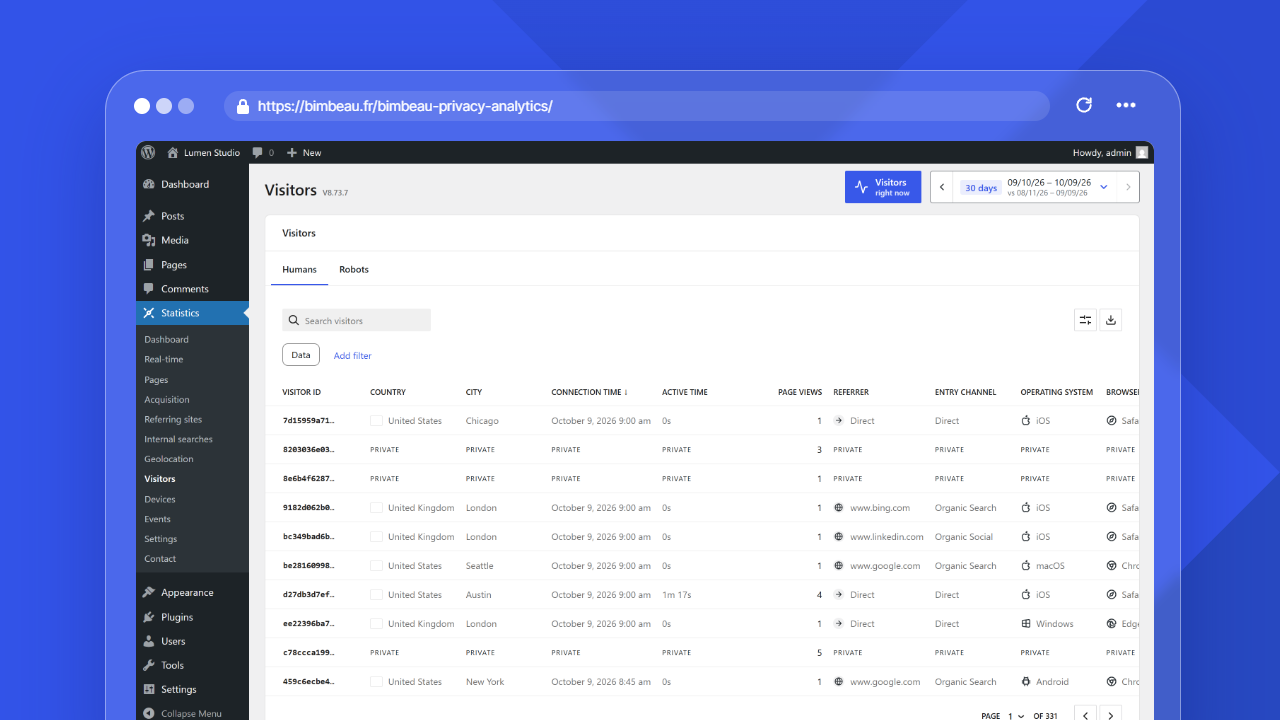
The Visitors report helps you understand bounded visitor activity on your WordPress website.
Use this report to review recent visitor activity, understand how bounded visitor rows interact with your content, and identify broad behavior patterns while respecting the tracking and privacy settings configured for your site.
Good to know
The Visitors report is available in BimBeau Privacy Analytics Free and BimBeau Privacy Analytics Pro. The level of detail depends on your tracking settings, consent workflow, and the data available for each visit.
Open the Visitors report
In your WordPress admin area, go to Statistics → Visitors.
Good to know
The Visitors report depends on advanced statistics. When Enable advanced stats after consent is turned off in the Tracking and privacy settings, the Visitors report is hidden from the Statistics menu.
Humans and Robots tabs
The report has two tabs above the table:
- Humans (default) lists the visitors counted in your statistics.
- Robots lists the visits detected as crawlers, monitoring tools, scanners, or other automated clients. Robots are excluded from all statistics: page views, visits, entry pages, acquisition, and visitor totals. This tab only lets you check what was filtered.
To open the Robots tab directly, add &bbpa_tab=robots to the Visitors report address.
The Robots table shows the columns that make sense for automated traffic:
| Column | What it means |
|---|---|
| Robot | The name of the robot, such as Googlebot, Bingbot, GPTBot or ClaudeBot, with the robot icon; Unidentified robot when the name is not recognized, and for robots recorded before this column existed |
| Visitor ID | A privacy-preserving identifier of the robot; it can be hidden from the visible Columns |
| Connection time | When the robot was first active |
| Last activity | When the robot was last active |
| Page views | The number of pages the robot requested |
| Entry page | The first page the robot requested |
The Device column (always Bot) is hidden by default and can be shown from the visible Columns.
Only the robot name is kept, recognized from a built-in list of common crawlers, AI bots, link previews, monitoring tools and HTTP libraries. The robot's User-Agent itself is never stored.
The Sort by control of the Robots tab sorts by Connection time, Last activity, or Page views.
List controls
The Visitors card shows two tabs, Humans and Robots, each with the number of rows of the selected period. Both lists use the WordPress list component (DataViews), the one of the Pages and Templates screens:
- the search field is at the top left of the list;
- the filter button (three lines) and Add filter add a filter on Country, Device or Entry channel; each active filter appears as a chip such as "Country is: France", its cross removes it and Reset removes them all;
- the View options button (cog icon) sets Sort by, the order (ascending or descending), the density (compact by default; the choice applies to every list and is kept for your account in this browser), the Items per page (5, 10, 20, 50 or 100) and the visible Columns; a column header also sorts or hides its column;
- in Pro, the export button sits next to it and exports the list with its search, filters and sort;
- the pagination at the bottom shows a page selector and the previous and next page arrows.
Sorting, filters and pages are computed on the server, so the totals (and, in Pro, the exports) always match the list. The Robots list keeps the activity columns only and has no filters.
Data filter: consented visitors only
Visitors without advanced (consented) data appear with Private cells. On the Humans tab, the Data filter lists only the Consented visitors:
- The pagination only covers the listed visitors, and a line under the list shows how many private visitors are hidden, for example "13 private hidden".
- The choice is saved for your WordPress account in this browser, so the list opens the same way next time.
- In Pro, exports follow the filter: when it is set, they only contain the listed visitors.
- The Data filter is not offered when advanced tracking is disabled in the settings, because every visitor would then be private. It is not available on the Robots tab.
What this report helps you understand
Use Visitors to answer questions such as:
- How many bounded visitor rows happened during the selected period?
- Which pages were viewed during a bounded visitor activity period?
- How active was a visitor row when timing data is available?
- Which device category was used?
- Which country or city is associated with the visitor row, when available?
- Which visitor rows only have essential data and which have enriched data?
- Which robots were detected and filtered out of the statistics?
Essential vs enriched visitor data
BimBeau Privacy Analytics separates baseline visitor reporting from enriched details.
Essential data keeps visitor reporting intentionally limited. It can provide basic visitor-row grouping and aggregate-safe activity while avoiding unnecessary detail.
Enriched data can provide deeper dimensions when advanced tracking is enabled, technically available, and allowed by your consent workflow.
Important
Some visitor fields may appear as private, unavailable, or empty. This can be normal when only essential tracking data is available or when advanced tracking is disabled or blocked.
Main columns
The Humans table can show detailed visitor rows when the required data is collected and allowed by your tracking and consent setup. The current table includes these columns.
| Column | What it means |
|---|---|
| Visitor ID | A privacy-preserving visitor identifier |
| Country | The detected country, when available |
| City | The detected city, when available (Pro) |
| Connection time | When the visitor row was first active |
| Active time | Measured foreground engagement time |
| Page views | The number of page views associated with the visitor row |
| Referrer | The detected traffic source for enriched visits, or Private for Essential-only visitor rows |
| Entry channel | The acquisition channel of the visit, or Private for Essential-only visitor rows |
| Operating system | The detected operating system, when available |
| Browser | The detected browser, when available |
| Browser version | The detected browser version, when available |
| Device | The detected device category, when available |
| Resolution | The detected screen or viewport resolution bucket, when available |
The Sort by control of the Humans tab sorts by Connection time (most recent first), Country, City (Pro), or Page views.
Private or unavailable fields
Visitor rows may contain limited information for several reasons:
- only essential tracking data was collected;
- advanced tracking is disabled;
- advanced tracking was not allowed by consent;
- the row uses Essential-only visitor data, so enriched visitor dimensions such as Country, City, Connection time, Active time, Referrer, Entry channel, Operating system, Browser, Browser version, and Resolution are shown as Private (set the Data filter to Consented visitors to list only the visitors with advanced data);
- the browser or device did not provide a usable signal;
- geolocation data was unavailable;
- the selected date range includes older or incomplete records.
Good to know
A limited visitor row does not necessarily indicate an error. It can reflect BimBeau Privacy Analytics privacy boundaries and your configured tracking behavior.
How to interpret visitor data
Visitors data is most useful when combined with aggregate reports.
For example:
- use Pages to identify popular content, then use Visitors to understand bounded visitor behavior;
- use Referring sites to identify acquisition sources, then review visitors associated with those sources;
- use Devices to understand device trends, then check individual visitor-row patterns when useful;
- use Real-time for recent activity, then Visitors for a more structured report view.
Active time
Active time measures foreground engagement when timing data is available.
It should not be interpreted as the full wall-clock duration of a browser tab. A visitor may leave a tab open without actively engaging with the page.
Important
Compare active time across similar contexts and date ranges. Do not compare one visitor row directly with a global dashboard average without considering filters, scope, and available timing data.
Date range
Use the date range controls to focus on a specific period.
Short ranges are useful for recent monitoring or campaign follow-up. Longer ranges can help identify recurring behavior patterns, but aggregate reports are usually better for high-level trend analysis.
Free and Pro behavior
BimBeau Privacy Analytics Free includes the Visitors report with essential visitor details. Enriched dimensions may be limited or unavailable depending on the collected data.
BimBeau Privacy Analytics Pro uses the same visitor reporting foundation. Pro export workflows are available on supported reports when licensed features are active.
Privacy and consent behavior
Visitor reporting follows your BimBeau Privacy Analytics privacy settings and consent configuration.
If advanced tracking requires consent on your website, your CMP should control whether advanced tracking is allowed to run.
Important
BimBeau Privacy Analytics is not a consent management platform. Make sure your CMP, privacy policy, and analytics configuration match your legal and operational requirements.
Exporting visitors data
Exports are a Pro feature.
When export actions are available, you can download supported visitor data for reporting, audit, or internal analysis.
Important
Visitor exports can contain detailed website activity data. Store and share exports according to your privacy policy and internal data handling rules.
Empty or unexpected results
If the Visitors report is empty or does not show the information you expect, check the following:
-
Check the selected date range
Visitor activity may exist outside the current reporting period.
-
Confirm that tracking is recording traffic
Open the Dashboard, Pages, or Real-time report to confirm that BimBeau Privacy Analytics is collecting activity generally.
-
Review role exclusions
If your WordPress role is excluded from tracking, your own test visit may not appear.
-
Review advanced tracking settings
If enriched fields are missing, check whether advanced tracking is enabled and allowed by your consent workflow.
-
Check the Data filter
While the "Data is: Consented visitors" chip is active, visitors without advanced data are not listed. The line under the list shows how many are hidden.
-
Check the Robots tab
Automated traffic is only listed in the Robots tab, never in the Humans tab or in the statistics.
-
Check geolocation and device availability
Some location or device fields may be unavailable because the required technical signals were not present.
Next step
Continue with Essential vs advanced tracking to understand how BimBeau Privacy Analytics separates baseline analytics from enriched tracking.