Pro features overview
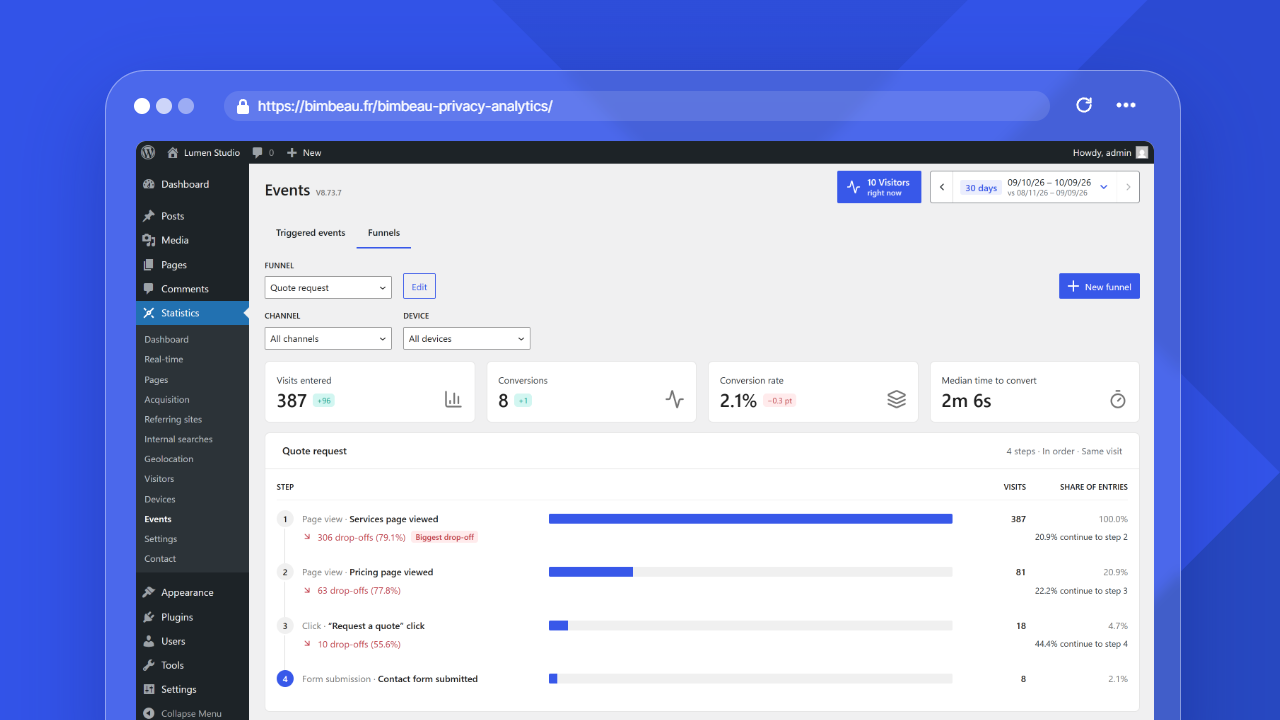
BimBeau Privacy Analytics Pro adds advanced reporting, export, customization, and workflow features on top of the core BimBeau Privacy Analytics analytics experience.
Use Pro when you need more than essential aggregate analytics and want deeper insight into pages, events, content performance, and reporting workflows.
Good to know
BimBeau Privacy Analytics Pro features may require an active Pro license or account connection before they appear in your WordPress admin area.
What Pro adds
BimBeau Privacy Analytics Pro is designed for users who need professional analytics workflows inside WordPress.
Depending on your version and configuration, Pro can add features such as:
- report exports;
- Page Details;
- event tracking and event configuration;
- conversion funnels, including a ready-made WooCommerce purchase funnel;
- daily, weekly or monthly email summaries;
- WooCommerce revenue per acquisition channel;
- content analytics in the WordPress editor;
- a dedicated PWA Stats App;
- analytics panel visibility controls;
- additional Pro-only display depth in selected reports.
Pro at a glance
| Pro feature | What it helps you do |
|---|---|
| Exports | Download supported analytics reports for external analysis, reporting, or archiving |
| Page Details | Analyze individual pages more deeply |
| Events | Track specific interactions or page behaviors |
| Conversion funnels | Measure the visits, drop-offs and conversion rate of each step, by channel and by device |
| Email summaries | Receive the key metrics, pages, referring sites and channels by email |
| WooCommerce | Attribute orders and revenue to the channel of the visit, and follow the purchase journey |
| Content analytics | View analytics context directly from WordPress content editing workflows |
| PWA Stats App | Access a dedicated app-like BimBeau Privacy Analytics interface |
| Interface customization | Choose which analytics panels appear in the navigation |
Exports
Exports let you download supported analytics reports for external use.
Use exports when you need to:
- share analytics with a client or stakeholder;
- archive a reporting period;
- analyze data in a spreadsheet;
- combine BimBeau Privacy Analytics data with another reporting workflow;
- keep a copy before changing retention settings.
Important
Exported files are outside BimBeau Privacy Analytics retention controls. Store, share, and delete exported analytics files according to your privacy policy and internal data handling rules.
Learn more in Exports.
Page Details
Page Details helps you analyze a specific page more deeply than the main Pages report.
Use Page Details when you want to understand:
- how one page performs over time;
- whether a page receives consistent or irregular traffic;
- how engagement changes across a selected period;
- whether a campaign or content update affected a page.
Learn more in Page details.
Events
Events help you track specific actions or behaviors that matter to your website.
Depending on your setup, events can help you monitor:
- clicks on important buttons;
- visits to specific pages or URL patterns;
- calls from other services through webhook events created with an older version;
- custom interaction tracking;
- event-level analytics and KPIs.
Good to know
Event tracking usually depends on advanced tracking, your event configuration, and your consent workflow.
Learn more in Events.
Conversion funnels
Conversion funnels follow the visits that complete several of your events in order, for example a view of the pricing page, a click on “Request a quote”, then a view of the thank-you page. They show the visits entered, the conversions, the conversion rate compared with the previous period, the median time to convert, the drop-offs at each step, and the details by acquisition channel and device. You can create up to 20 funnels of 2 to 8 steps.
Learn more in Conversion funnels.
WooCommerce
With WooCommerce active, Pro attributes paid orders to the acquisition channel of the visit that placed them (after consent), adds Orders, Revenue and Conversion rate columns to the Acquisition report, shows a Purchase journey card, and offers a ready-made purchase funnel with revenue.
Learn more in WooCommerce purchase funnel.
Email summaries
Email summaries send the key metrics, top pages, referring sites and channels of a period to up to 10 recipients, daily, weekly or monthly.
Learn more in Email summaries.
Content analytics
Content analytics helps connect BimBeau Privacy Analytics insights with WordPress content workflows.
When Quick Stats is enabled for supported post types, WordPress content list tables can show a sortable Views (30d) column with compact view totals and inline traffic charts. Post and page editor screens can also show a Stats metabox with a 30-day summary, trend chart, average time on page, and visitor profile highlights when data is available.
Use content analytics to:
- identify posts or pages with meaningful activity from the normal WordPress content list;
- review compact traffic trends before opening a full analytics report;
- review performance directly while editing posts or pages;
- open deeper Page Details analytics from content screens where available;
- connect analytics with content optimization decisions.
Learn more in Content analytics.
Interface customization
Interface customization adapts how BimBeau Privacy Analytics appears in WordPress admin.
Use it when you want to:
- choose which analytics panels appear in the plugin navigation;
- keep client, agency, or internal reporting workflows focused on the reports users need.
Learn more in Interface customization.
PWA Stats App
The PWA Stats App provides a dedicated app-like interface for BimBeau Privacy Analytics.
Use it when you want a focused analytics experience separate from the standard WordPress admin layout.
Depending on your configuration, the app may support dedicated access, install-like behavior, and a streamlined analytics interface.
Learn more in PWA Stats App.
Pro and privacy
Pro features follow the same privacy principles as the rest of BimBeau Privacy Analytics.
Some Pro features may rely on advanced tracking or enriched analytics signals. If your website requires consent for those signals, make sure your CMP controls advanced tracking according to your privacy policy.
Important
BimBeau Privacy Analytics Pro does not replace your CMP, privacy policy, consent records, or legal compliance process.
Pro and Free reports
BimBeau Privacy Analytics Pro does not replace the core reports available in BimBeau Privacy Analytics Free. Instead, it extends the reporting workflow with deeper analysis, exports, and advanced features.
Core reports such as Dashboard, Pages, Referring sites, Internal searches, Pages not found, Devices, Geolocation, Real-time, and Visitors provide the baseline analytics experience.
Pro features add advanced workflows such as exports, Page Details, Events, content analytics, app access, interface customization, and additional Pro-only display depth when licensed features are active and the required data is available.
When to upgrade to Pro
Consider BimBeau Privacy Analytics Pro if you need to:
- export analytics reports;
- analyze individual pages in more detail;
- track important interactions with events;
- measure conversion funnels and where visitors drop off;
- attribute WooCommerce orders and revenue to acquisition channels;
- receive analytics summaries by email;
- use analytics in editorial workflows;
- access a dedicated app-like analytics interface;
- choose which reports appear in the navigation;
- support client, team, or professional reporting needs.
Troubleshooting Pro access
If Pro features do not appear, check the following:
- Confirm your license or account connection
Make sure your Pro license is active and connected to the correct account.
- Check your WordPress user permissions
Confirm that your WordPress user can access BimBeau Privacy Analytics settings and Pro features.
- Refresh the WordPress admin area
After activating or connecting Pro, reload the BimBeau Privacy Analytics admin screens.
- Check plugin version
Make sure you are running the expected BimBeau Privacy Analytics version and that the Pro package or license state is current.
- Review consent and tracking settings
Some Pro features may need advanced tracking or consent-based enrichment to show complete data.
Next step
Continue with Exports to learn how Pro report exports work.