Internal searches
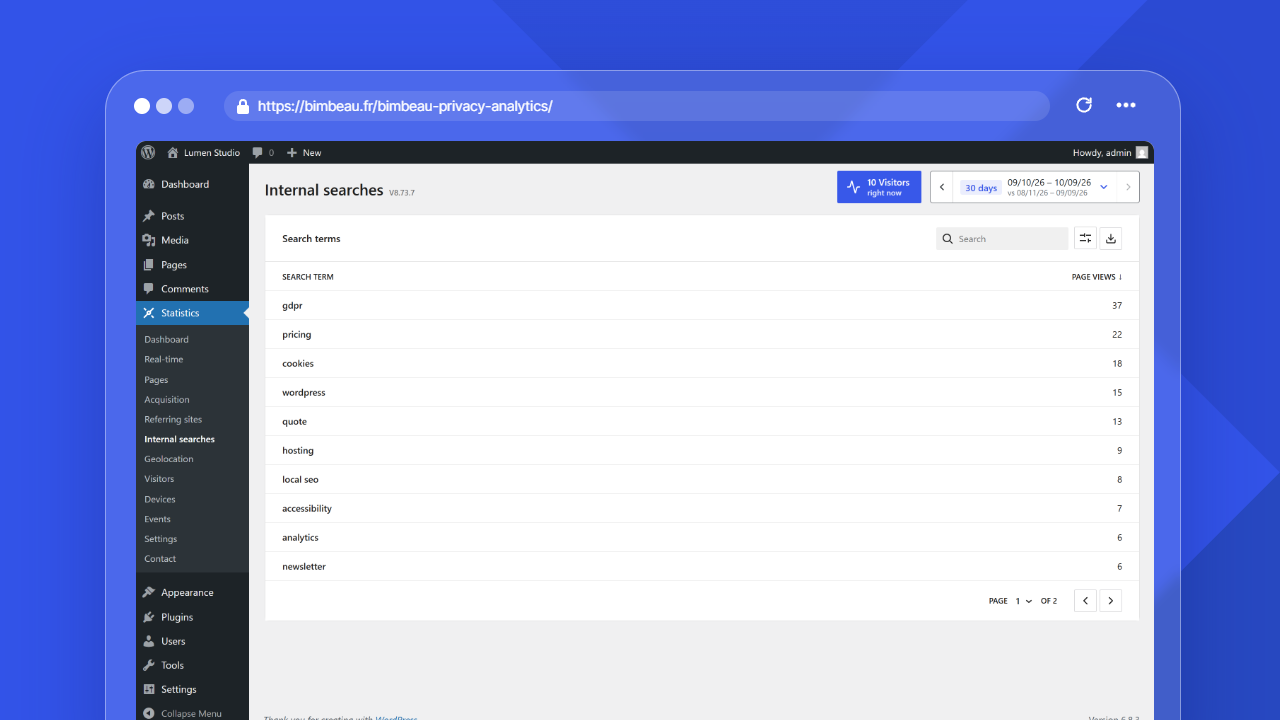
The Internal searches report helps you understand what visitors search for on your WordPress website.
Use this report to identify visitor intent, improve content, discover missing information, and refine your website navigation.
Good to know
Search terms are based on searches performed through your website search experience. They are different from search engine keywords used before visitors arrive on your site.
Open the Internal searches report
In your WordPress admin area, go to Statistics → Internal searches.
The menu item is named Internal searches; on the report screen, the list card is titled Search terms.
What this report helps you understand
Use Internal searches to answer questions such as:
- What are visitors trying to find on my website?
- Which topics are users interested in?
- Are visitors searching for content that already exists?
- Are visitors searching for content that is missing or hard to find?
- Which terms should influence future content, navigation, or landing pages?
What counts as an internal search term
A search term is usually the query submitted through your WordPress site search or a compatible internal search experience.
For example, if a visitor uses your site search field and searches for pricing, BimBeau Privacy Analytics may record pricing as an internal search term.
Important
Search terms can reflect user intent. Review and handle this data according to your privacy policy and internal data handling rules.
Main columns
The Internal searches report lists search terms entered through your site search. The current table shows these columns.
| Column | What it means |
|---|---|
| Search term | The term or phrase searched on your website |
| Page views | The number of tracked search-result page views for that term during the selected period |
List controls
The list uses the WordPress list component (DataViews), the one of the Pages and Templates screens: the search field is at the top left, and, in Pro, the export button sits at the top right next to the View options button (cog icon), which sets Sort by, the order (ascending or descending), the density (compact by default; the choice applies to every list and is kept for your account in this browser), the Items per page (5, 10, 20, 50 or 100) and the visible Columns. Clicking a column header also sorts the list in ascending or descending order. Sorting is computed on the server. When the results fill more than one page, the pagination at the bottom shows the item count, a page selector and the previous and next page arrows.
How to interpret search terms
Internal search terms are useful because they show what visitors actively ask your website to provide.
Look for patterns such as:
- repeated searches for the same topic;
- searches for products, services, or pages that are hard to find;
- searches that reveal missing content;
- spelling variants or synonyms visitors commonly use;
- seasonal or campaign-related terms.
Content improvement ideas
Search terms can guide practical content improvements.
-
Identify repeated searches
Find terms that appear frequently during the selected period.
-
Check whether the content exists
Search your own website for the same term and confirm whether useful content already exists.
-
Improve discoverability
If the content exists but visitors still search for it, consider improving navigation, internal links, page titles, or calls to action.
-
Create missing content
If visitors search for something you do not cover yet, consider creating a new page, article, FAQ entry, product description, or support resource.
Date range
Use the date range controls to focus on a specific period.
Short ranges are useful after a campaign, launch, or content update. Longer ranges help identify recurring user intent and long-term content gaps.
Internal searches vs search engine keywords
Search terms are queries visitors enter inside your website search experience after they are already on your site.
Search engine keywords are queries visitors may have used in external search engines before arriving on your website. These are often limited or unavailable because search engines and browsers restrict keyword visibility.
Free and Pro behavior
BimBeau Privacy Analytics Free includes internal search term reporting for aggregate website analytics.
BimBeau Privacy Analytics Pro adds export workflows for supported reports while keeping the same core Internal searches reporting foundation.
Exporting search terms
Exports are a Pro feature.
When export actions are available, you can download search terms data for content planning, SEO research, UX improvements, or internal reporting.
Important
Exported analytics files may contain user-entered search queries. Store and share exports according to your privacy policy and internal data handling rules.
Empty or unexpected results
If the Internal searches report is empty or does not show the terms you expect, check the following:
-
Confirm that your site has a search experience
Search terms only appear when visitors use a supported internal search flow on your website.
-
Check the selected date range
The searches may have happened outside the current reporting period.
-
Run a test search
Open your website, perform an internal search, then return to BimBeau Privacy Analytics after a short moment.
-
Review tracking settings
Make sure your current role, privacy settings, consent setup, or exclusion rules are not preventing activity from being recorded.
Next step
Continue with 404 errors to identify missing pages and broken links in the Pages report.