Email summaries
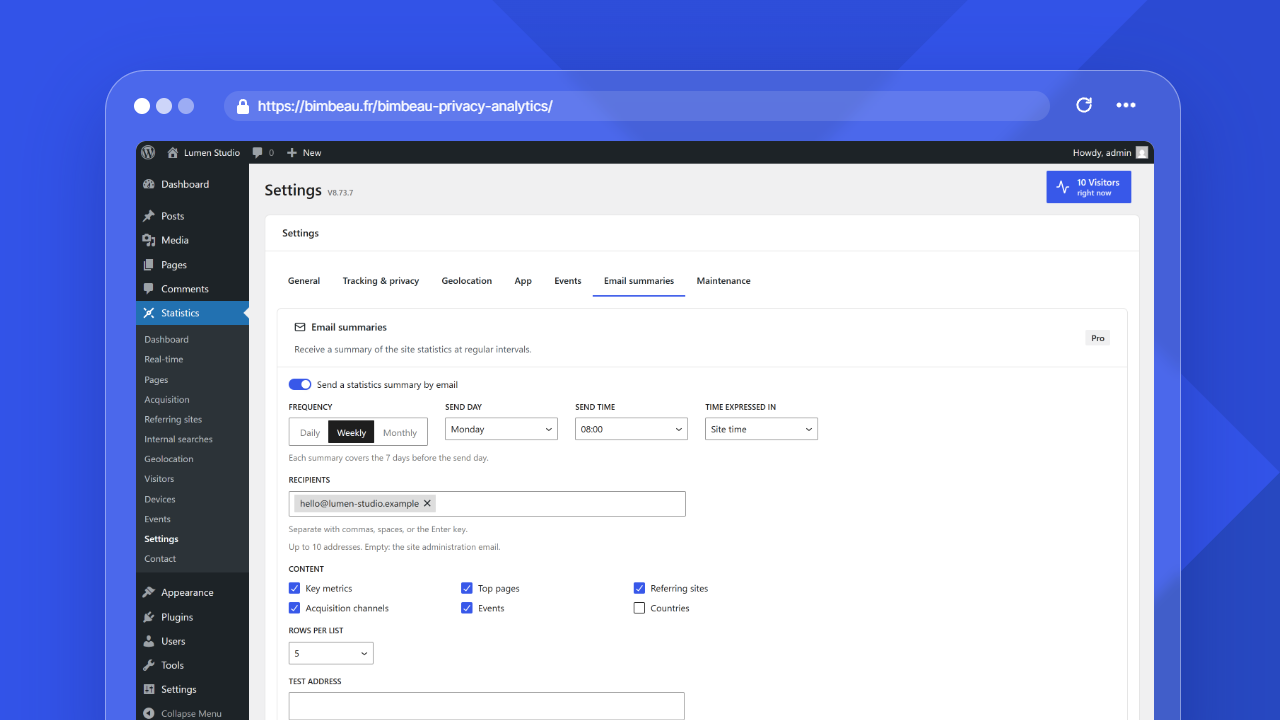
Email summaries send a report of your site statistics by email at regular intervals: daily, weekly or monthly.
Good to know
Email summaries are a BimBeau Privacy Analytics Pro feature. They are off until you turn them on.
Where to find email summaries
In the WordPress admin area, open Statistics → Settings → Email summaries.
Settings
| Setting | What it does |
|---|---|
| Send a statistics summary by email | Turns the scheduled summaries on or off. |
| Frequency | Daily, Weekly or Monthly, side by side; the selected frequency is highlighted. |
| Send day | Weekly only: the day of the week the summary is sent. |
| Send time | The hour the summary is sent. |
| Time expressed in | Site time (default): the send time follows the site timezone shown under the field. UTC: the send time is in Coordinated Universal Time and does not move when the clocks change; the field shows the matching site time for today. |
| Recipients | Up to 10 email addresses. When the list is empty, the summary goes to the site administration email. |
| Content | The sections of the summary: Key metrics, Top pages, Referring sites, Acquisition channels, Events and Countries. |
| Rows per list | 3, 5 or 10 rows in each list of the summary. |
Default values: Weekly frequency, sent on Monday at 08:00 (Site time), Key metrics, Top pages, Referring sites, and Acquisition channels sections, and 5 rows per list.
Click Save settings at the bottom of the screen to apply the settings. The next send is scheduled when you save.
Pro license required
No scheduled summary is sent without an active Pro license. If the license is no longer active, the scheduled send is cancelled, even when Send a statistics summary by email stays checked; it is scheduled again when the license becomes active again.
What each summary covers
| Frequency | Sent | Covers |
|---|---|---|
| Daily | Every day at the send time | The previous day |
| Weekly | On the send day at the send time | The 7 days before the send day |
| Monthly | On the 1st of each month at the send time | The previous month |
With UTC, the send day (the 1st of the month, the send day of the week or every day) is also the UTC day; the period covered is still counted in site days.
To send the summary at the same moment as another tool that schedules in UTC, choose UTC and the same hour: for example 11:00 UTC is 13:00 in Paris in summer and 12:00 in winter.
Each change is compared with the previous period of the same length, for example the previous week for a weekly summary.
Sections
- Key metrics: visitors, page views, pages per visit and average active time, with their change, plus page views per day for weekly and monthly summaries.
- Top pages and Referring sites: the most viewed pages and the referring sites that brought the most visits, with their change.
- Acquisition channels: the share of visits per channel.
- Events: the most triggered events, when events are configured.
- Countries: the countries with the most visitors.
Every summary ends with a button that opens the dashboard and a link to these settings.
Test email and preview
- Send a test email sends the summary of the last completed period now, only to the Test address above the button. It is prefilled with your own email address; change it to try another mailbox. The recipients of the form do not receive the test.
- Preview opens the same summary in a new browser tab without sending it.
Both use the values of the form, even before you save them. A test email does not change the last send shown under the buttons.
Delivery
Summaries are sent with the WordPress email function, one email per recipient, so recipients do not see each other's address. If test emails do not arrive, check the email configuration of your site, for example with an SMTP plugin.
The send relies on WordPress scheduled tasks, which run when the site receives visits. On a site with very little traffic, a summary can arrive later than the send time.
Important
A summary contains site statistics. Only add addresses of people allowed to see them.
Next step
Continue with Maintenance to manage stored data.