Acquisition
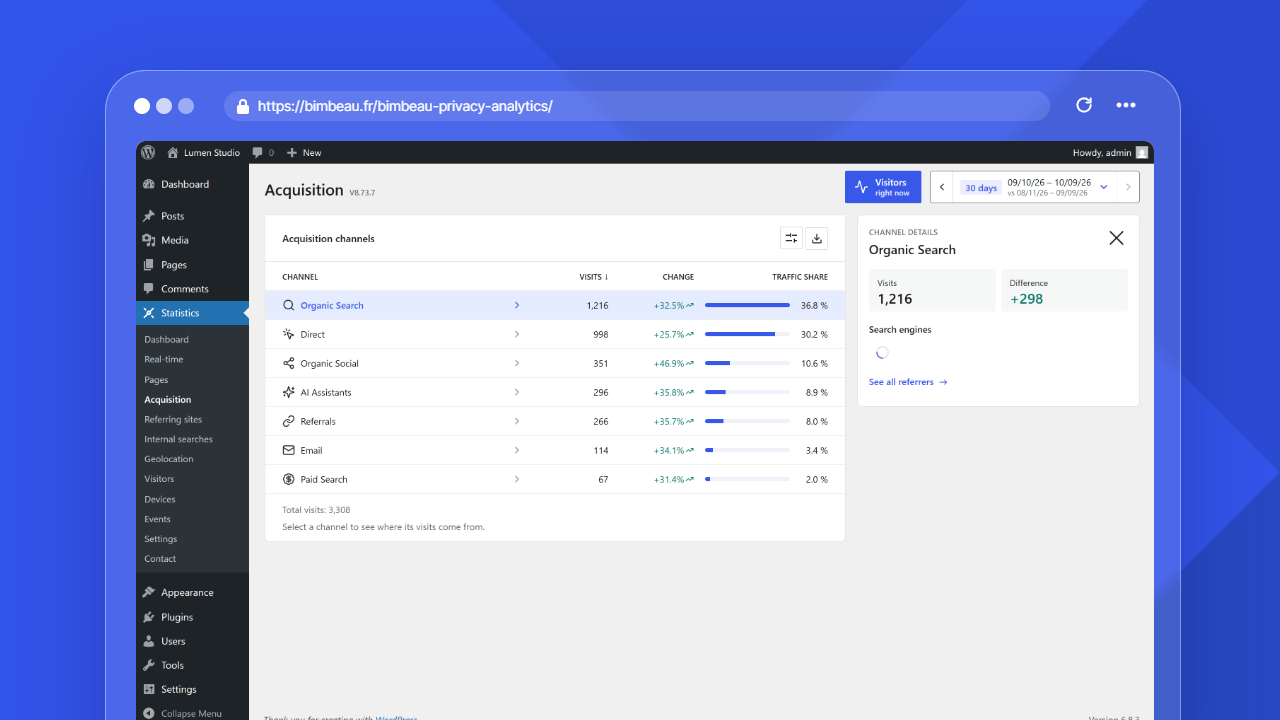
The Acquisition report summarizes visits by traffic channel for the selected date range. Each visit is attributed once to the channel that starts the visit, while page-view totals remain separate from the visit count. It provides a higher-level traffic-source view than the Referring sites report, which remains focused on individual referring domains.
Channel table
The channel table uses the WordPress list component (DataViews), the one of the Pages and Templates screens: the export button is at the top right next to the View options button (cog icon), and the total visits and the WooCommerce note sit under the table. Click a column header to sort the channels, or use View options, which also holds the density (compact by default; the choice applies to every list and is kept for your account in this browser), Items per page (10, 20 or 50) and Columns, where the Traffic share column and the WooCommerce columns can be hidden. The table shows:
| Column | Description |
|---|---|
| Channel | The acquisition channel assigned to the visit source. |
| Visits | The number of visits attributed to the channel. |
| Change | The change in visits compared with the previous equivalent period when comparison data is available, or New for a channel without visits in that period. |
| Traffic share | The channel percentage of all visits in the selected range. |
Channel details
The details of the channel with the most visits open to the right of the table, or below the table on a narrow screen. Click another channel name (or focus it and press Enter) to show its details instead. The selected row stays highlighted. The details show:
- the visits of the channel, the visits of the previous period and the difference;
- the sites these visits come from, with a proportional bar: search engines for Organic Search, social networks, AI assistants, referring sites, or the main sources of campaigns (No referring site groups the campaign visits opened without a referring site, from an email for example);
- for Direct, an explanation instead of the sources, since no referring site is sent for these visits;
- a link to the detailed report: the entry pages for Direct, the referrers for the other channels.
The sources come from the same data as the Referrers report; only the 1,000 referring sites with the most visits in the period are taken into account. Click the channel again, use the close button, or press Escape in the details to close them; they stay closed until you click a channel again.
Channels
BimBeau Privacy Analytics uses the stored source category for the report. The available channels can include Direct, Organic Search, AI Assistants, Paid Search, Paid Social, Organic Social, Referrals, Email, Other Campaigns, and Other, depending on the captured traffic sources and tracking data available for the selected period. Campaign parameters take priority over the referring domain for Email, Paid Social, Paid Search, Organic Social, and Other Campaigns classification. Referring domains classify AI assistants, search engines, social networks, external referrals, and direct visits when no higher-priority campaign context is available.
Attribution uses the first acquisition signal identified during a visit. Internal navigation and later page views without campaign or external-referrer information inherit that visit attribution. Direct represents the absence of an acquisition signal: a direct visit can be upgraded when a campaign or external referrer is subsequently identified, but Direct cannot replace a known non-direct channel. A later campaign during the same visit does not replace the visit's first known non-direct channel; a new visit establishes a new attribution.
Google Ads and Meta Ads are platforms or sources, not primary acquisition channels. The acquisition report classifies traffic by channel first: Paid Search, Paid Social, Organic Social, Email, Referrals, Direct, AI Assistants, Organic Search, Other Campaigns, or Other.
Channel classification follows these source rules:
| Channel | Classification rule |
|---|---|
| Visits with UTM parameters that identify an email or newsletter source, medium, or campaign context. | |
| Paid Search | Google Ads search traffic with gclid or paid search UTM values is classified as Paid Search. Paid search UTM media include cpc, ppc, paidsearch, paid_search, and sem when the source is not classified as social traffic. |
| Paid Social | Meta, Facebook, or Instagram paid traffic with paid social UTM values is classified as Paid Social. Paid social signals include media such as paid_social, social_paid, paidsocial, paid-social, and social sources with paid media such as sponsored, ads, cpc, ppc, or paid. |
| Organic Social | Social referrers without paid campaign signals are classified as Organic Social. |
| Other Campaigns | Generic UTM campaigns without a more specific rule are classified as Other Campaigns. |
| AI Assistants | Visits that match known AI assistant sources through tracking data or the referring domain when available. |
| Organic Search | Visits that match search-engine sources through tracking data or the referring domain when available. |
| Referrals | Visits from an external referring domain when no more specific channel applies. |
| Direct | Visits without usable campaign, click identifier, or external referrer data. |
| Other | Visits with source data that does not match another channel. |
The channel labels shown in the admin interface are localizable labels. The underlying classification still uses stable channel keys so the report remains consistent across languages.
URLs, campaigns, and Paid Search
If Clean URL query parameters is enabled, BimBeau Privacy Analytics can still preserve common marketing attribution keys through the Allowed query parameters setting.
New installs include the common attribution keys utm_source, utm_medium, utm_campaign, gclid, gbraid, wbraid, and msclkid by default. Existing installs with a missing or empty allowlist are backfilled once during activation or upgrade checks, while custom non-empty allowlists are preserved.
Important
Do not put personal data in UTM values or advertising query parameters. Campaign values may be stored for attribution and reporting.
WooCommerce orders and revenue
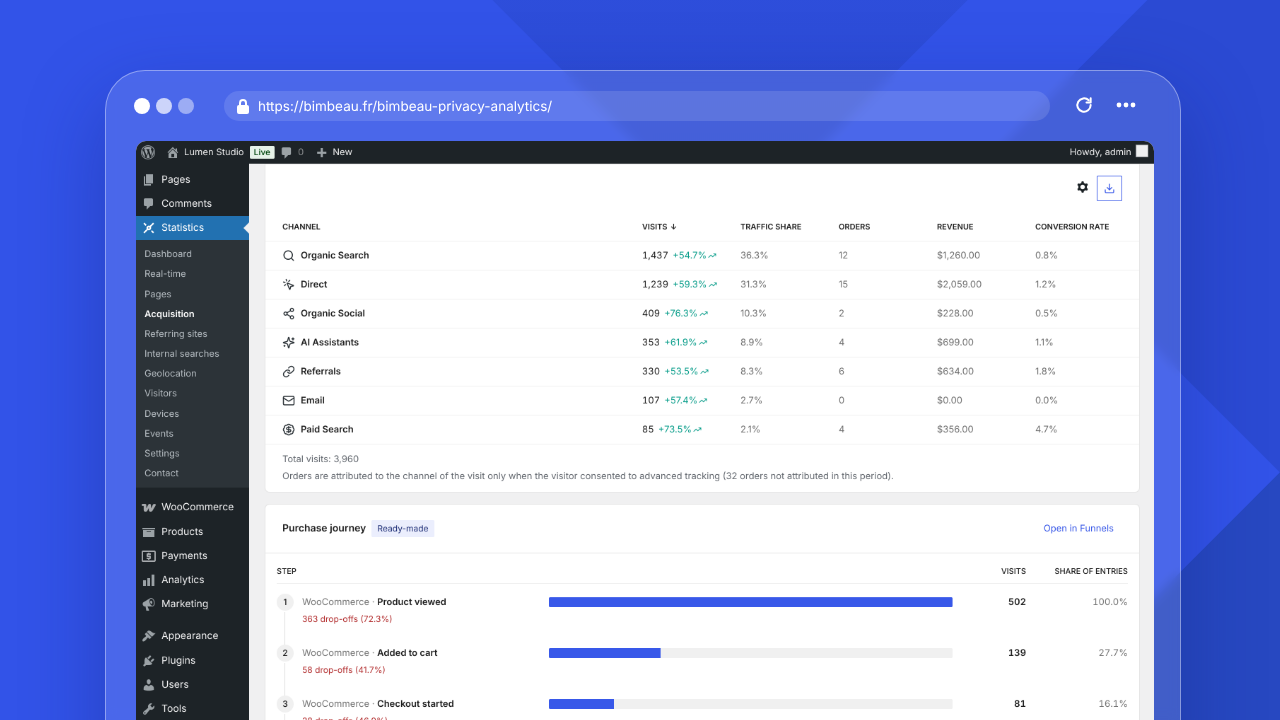
With BimBeau Privacy Analytics Pro and WooCommerce active, the channel table adds three columns:
| Column | Description |
|---|---|
| Orders | Paid orders attributed to the channel, counted on their payment date. |
| Revenue | The total of these orders minus refunds, in the store currency. |
| Conversion rate | Orders per 100 visits of the channel. |
An order is attributed to the channel of the visit that placed it only when the visitor consented to advanced tracking: when the order confirmation page loads with the advanced tracker running, BimBeau Privacy Analytics stores the channel and the referring site of the visit on the order. Nothing else is stored on the order, and nothing is sent without consent. Other paid orders are counted as not attributed; the line under the table gives their number for the period.
Refunded or cancelled orders leave the report automatically. The figures can differ from WooCommerce Analytics, which counts orders on their creation date and includes taxes and shipping according to its own settings.
Purchase journey
With BimBeau Privacy Analytics Pro and WooCommerce active, a Purchase journey card, marked Ready-made, sits under the channel table. It shows the four steps of the ready-made WooCommerce purchase funnel for the selected period (product viewed, added to cart, checkout started, order placed), with the visits that reach each step and the drop-offs before the next one. You do not need to save the funnel first. Open in Funnels opens the Funnels tab of the Events report, where the funnel adds revenue, channel and device details (see Conversion funnels).
The steps are recorded only once the advanced tracker runs, so after consent when a consent tool gates it. The card is hidden for users who cannot open the Events report.
Export
Exports are a Pro feature. When export actions are available in BimBeau Privacy Analytics Pro, you can download acquisition channel rows in the supported analytics export formats.