Interface customization
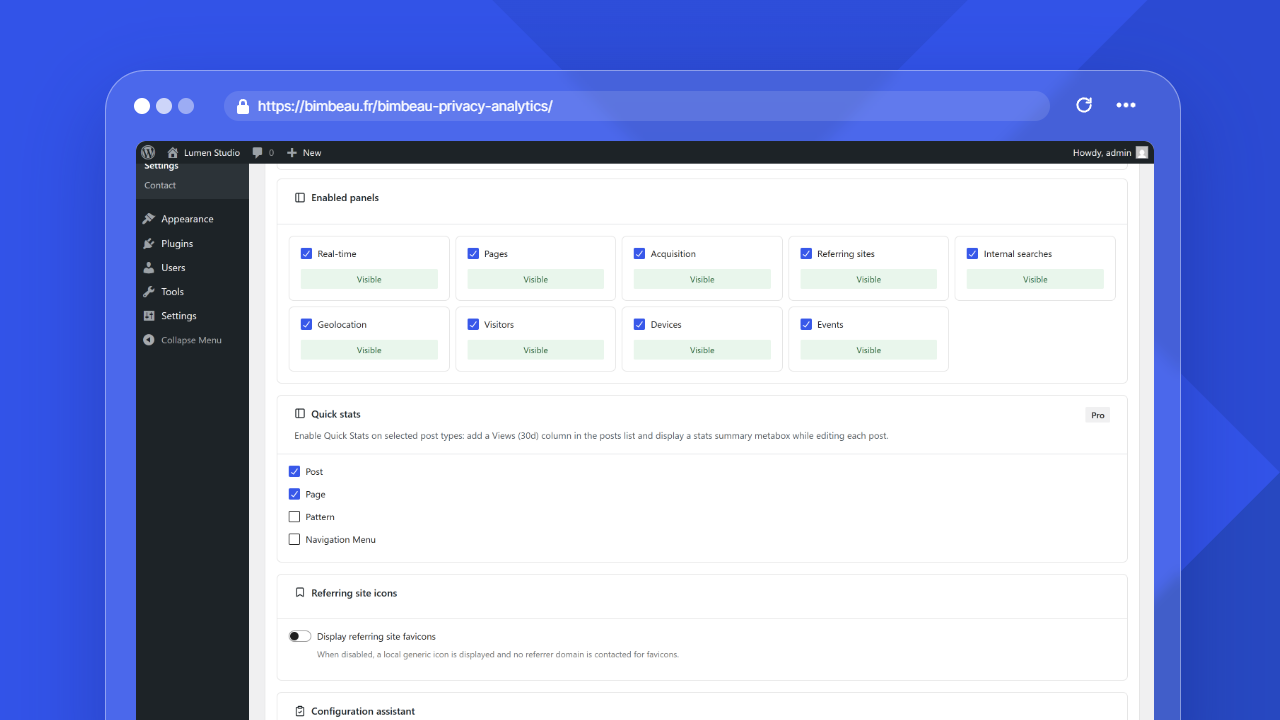
BimBeau Privacy Analytics Pro includes interface customization controls for adapting the plugin navigation inside WordPress admin.
Use these settings when a site needs to keep client, agency, or internal reporting focused on the reports users need.
Availability
Interface customization is a BimBeau Privacy Analytics Pro feature. The controls appear only when your active plan and license state make Pro customization available.
Where to find interface customization
In the WordPress admin area, open Statistics → Settings → General.
The relevant Pro section is Enabled panels.
Header title
In both Free and Pro, the WordPress admin header and the PWA Stats App header display the localized Statistics title, which follows the active site or user language. The WordPress admin menu uses the same localized label. No setting changes this title.
Enabled panels
The Enabled panels section controls which BimBeau Privacy Analytics analytics panels appear in the plugin navigation.
Available panel choices can include:
- Pages;
- Acquisition;
- Referring sites;
- Internal searches;
- Geolocation;
- Visitors;
- Devices;
- Events;
- Real-time.
A selected panel appears as Visible. A deselected panel appears as Hidden and does not appear in the normal BimBeau Privacy Analytics navigation.
Dashboard and settings
The main dashboard and settings screens remain available to users with the required permissions. Enabled panels apply to the analytics panels that can be hidden from the standard report navigation.
Advanced stats dependency
Some panels depend on advanced stats. When Enable advanced stats after consent is disabled, BimBeau Privacy Analytics can keep panels that depend on advanced data hidden, even if they are selected in Enabled panels.
Panels affected by this dependency include:
- Geolocation;
- Visitors;
- Devices;
- Events;
- Real-time.
Before hiding panels
Before hiding a panel, confirm that users who rely on that report have another way to access the information they need.
Hiding a panel changes navigation visibility. It does not delete historical analytics data.