Tracking and privacy
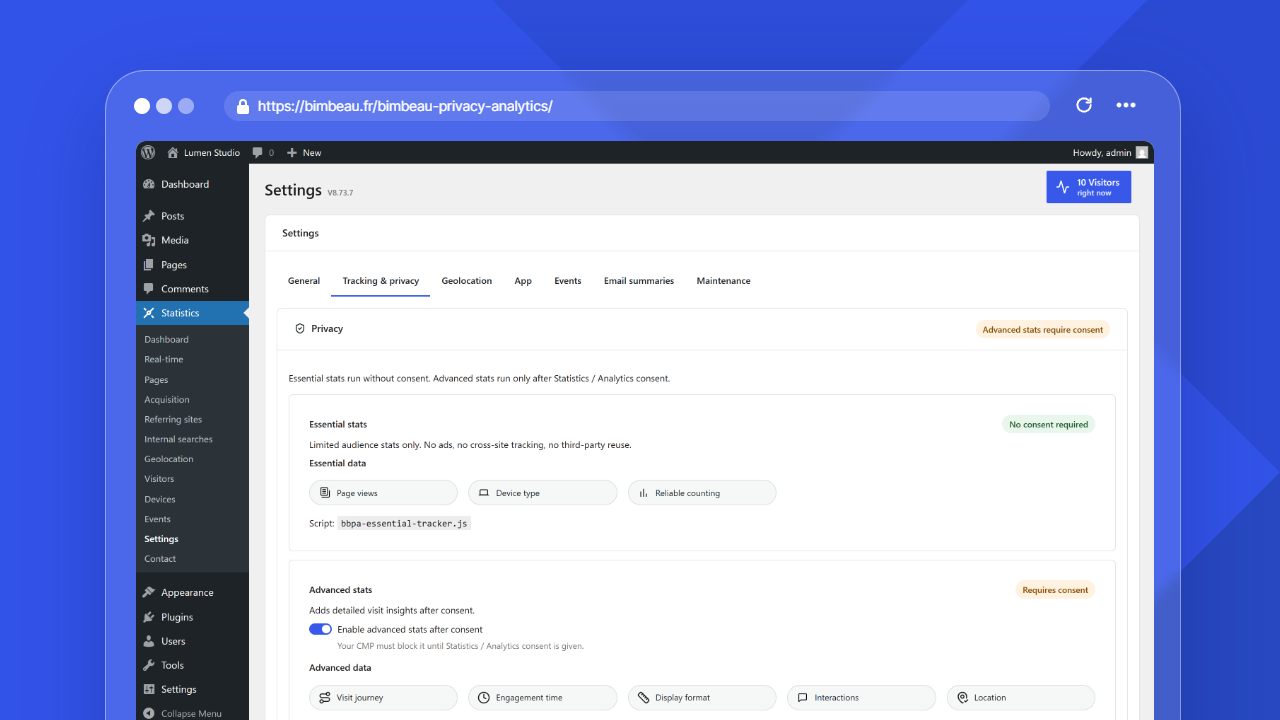
Tracking and privacy settings control what BimBeau Privacy Analytics measures, how visits are grouped, how URLs are stored, how long analytics data is kept, which roles and pages are excluded, and whether debug logging is enabled.
Important
BimBeau Privacy Analytics provides technical privacy controls, but it does not replace a consent management platform, cookie banner, privacy policy, or legal review.
Where to find tracking and privacy settings
In the WordPress admin area, open Statistics → Settings → Tracking & privacy.
Essential tracking
Essential tracking is the baseline measurement layer. It is designed for limited audience statistics and core aggregate reports.
The settings interface presents essential stats as the baseline analytics layer in the plugin's tracking model. Essential data includes items such as:
- page views;
- visit origin;
- device type;
- reliable counting.
Advanced tracking
Advanced tracking adds detailed visit insights when it is enabled and allowed by your consent workflow.
Depending on your plan, configuration, and consent setup, advanced data can include items such as:
- visit journey;
- engagement time;
- display format;
- interactions;
- location.
Use Enable advanced stats after consent only when your consent workflow is configured to block or release advanced analytics at the right time.
Consent behavior
When advanced stats are enabled, BimBeau Privacy Analytics exposes the advanced tracker as a CMP-targetable script.
Your CMP must block or release the BimBeau Privacy Analytics advanced tracker according to the visitor's relevant consent. BimBeau Privacy Analytics can expose the script, script ID, and WordPress handle used for CMP configuration in the settings interface.
Important
BimBeau Privacy Analytics does not replace your CMP. Your CMP manages the consent banner, stores visitor choices, and controls whether advanced analytics scripts are allowed to run.
Respect DNT / GPC
Respect DNT / GPC is enabled by default. While it is enabled, BimBeau Privacy Analytics stops measurement when the visitor's browser sends a Do Not Track or Global Privacy Control signal.
Use this option when your privacy approach treats those browser signals as opt-out signals for analytics measurement.
Visitor activity window
The Visitor activity window controls how long activity from the same visitor can remain grouped into one temporary visitor row.
Essential tracking can store this first-party technical identifier in the visitor's browser through localStorage or sessionStorage. The identifier is used only to group activity into a bounded visitor row, prevent technical duplicate transport hits, and produce aggregated or anonymized audience statistics. It is not used for advertising, cross-site tracking, or visitor profiling.
The default value is 1800 seconds, or 30 minutes. The settings interface accepts values from 300 to 86400 seconds:
- shorter windows can split activity into more visitor rows;
- longer windows can keep more continuous activity in one visitor row.
Expired browser storage entries are removed automatically when the tracker runs or reads the stored state again.
URLs and campaigns
The URLs & campaigns section controls how query parameters are handled in tracked URLs.
| Setting | What it does |
|---|---|
| Clean URL query parameters | Removes query parameters from tracked URLs |
| Allowed query parameters | Keeps a comma-separated list of allowed query keys for URL tracking and UTM aggregation |
Use the allowlist for campaign parameters that should remain available for attribution, such as UTM keys, while removing unnecessary or sensitive query parameters.
New installs include these common marketing attribution keys in the default allowlist:
utm_source;utm_medium;utm_campaign;gclid;gbraid;wbraid;msclkid.
Existing installs with a missing or empty allowlist are backfilled once during activation or upgrade checks. If you already configured a non-empty custom allowlist, BimBeau Privacy Analytics preserves it.
Important
Do not put personal data in UTM values or allowed query parameters. These values can be stored for attribution, campaign reporting, and channel classification.
Data retention
The Data retention section lets you set retention periods for temporary detailed events, report details, and long-term totals, and choose how often automated cleanup runs.
| Field | Default | Allowed range | What it keeps |
|---|---|---|---|
| Temporary detailed events retention (days) | 1 day | 1 to 365 days | Temporary detailed events (raw logs), used mainly for real-time and diagnostics. Not related to Debug mode. |
| Report details retention | 365 days | 30 to 3,650 days | Detailed report dimensions such as pages, referrers, countries, devices, and visitor details |
| Long-term totals retention | 730 days | 365 to 3,650 days, and never shorter than report details retention | Anonymous daily totals for dashboard KPIs and the page views/visitors chart after report details expire |
| Automatic cleanup frequency | Every 30 days | 1 to 365 days | How often WordPress checks for expired analytics data |
The two retention lists offer preset durations (for example 30, 90, 365 or 730 days). The cleanup frequency list offers 1, 7, 15, 30, 45, 60 and 90 days.
Retention cleanup permanently removes data older than the selected window. See Data retention for a detailed explanation.
Exclusions by role
The Exclusions section lets you select WordPress roles to exclude from tracking.
Select the roles that represent internal users whose activity should not appear in analytics. Selecting all roles ignores all logged-in users.
The exclusion applies to page views and to enriched activity (active time) of logged-in users with an excluded role. It is decided when the page is displayed, so it relies on the fact that page caches do not serve pages generated for logged-in users to other visitors, which is the default behavior of WordPress cache plugins.
Excluded paths
The Exclusions section also contains the Excluded paths field. List the pages that must not be counted, one page path per line:
- You can also separate paths with commas on one line:
/contact, /thank-you. A comma always separates two paths, so a page path that contains a comma cannot be entered in this field. - Enter the path, not the full address:
/contact, nothttps://example.com/contactorexample.com/contact. A full address, with or withouthttps://, is refused when you save. A file name such aspage.htmlis accepted. - Letter case, a trailing slash and the query string are ignored:
/contactalso excludes/Contact/and/contact?utm_source=newsletter. - There is no wildcard and no prefix matching:
/contactdoes not exclude/contact/teamor/contact-us. List each page you want to exclude. - For an address with accented or non-Latin characters, enter the encoded form that your browser gives when you copy the address, for example
/caf%C3%A9for/café. - After the save, the field shows the list as it is stored: lowercase, with one leading slash, without a trailing slash and without duplicates.
Listed pages stop being counted when you save: they add no page view, visitor, real-time entry, time on page, or entry or exit page. A visit that starts on an excluded page and continues on another page is counted from that other page, as a direct visit. 404 and search tracking also skip excluded paths.
Good to know
Statistics already recorded for these pages do not change. Removing a page from the list counts it again from that moment, without restoring the visits made while it was excluded. Pro event tracking is not affected: events fired on an excluded page are still recorded.
Debug mode
The Debug section includes Debug mode.
When enabled, BimBeau Privacy Analytics writes detailed diagnostic logs for troubleshooting tracking events, real-time visitor detection, and REST payloads. Logs can appear in the browser console and in wp-content/debug.log when WordPress debug logging is enabled.
Important
Use debug mode only while troubleshooting. Disable it again when you no longer need diagnostic output.