Maintenance
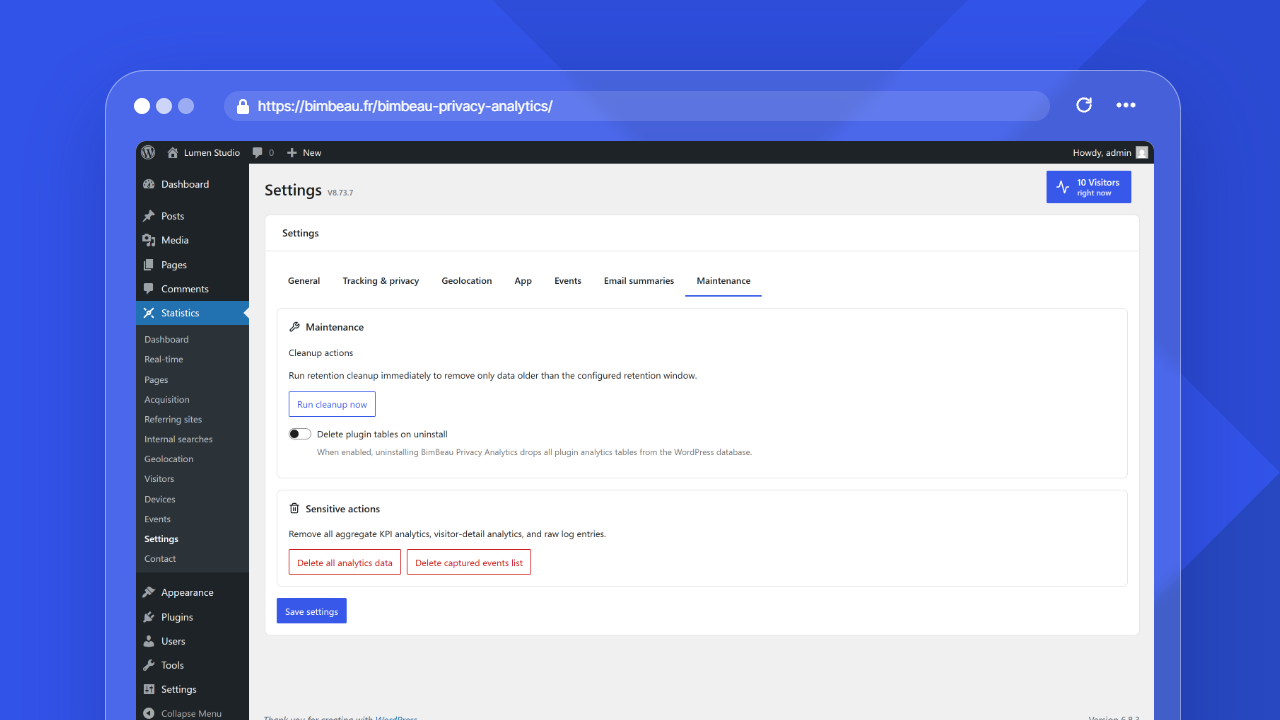
Maintenance settings help you clean up analytics data, configure uninstall cleanup, and perform sensitive deletion actions.
Be careful
Maintenance actions can permanently delete analytics data. Export or back up important reports before using destructive actions.
Where to find maintenance settings
In the WordPress admin area, open Statistics → Settings → Maintenance.
Cleanup, deletion, and uninstall: what is different?
| Action type | What it does |
|---|---|
| Cleanup | Removes only data older than the configured retention window |
| Delete analytics data | Removes stored analytics data while keeping plugin settings unchanged |
| Delete captured events list (Pro) | Removes the list of captured events shown in Events stats while keeping other analytics data unchanged |
| Delete plugin tables on uninstall | Removes all BimBeau Privacy Analytics data (tables, settings, temporary data, scheduled tasks, GeoIP database and export files) when the plugin is uninstalled, if the option is enabled before uninstalling |
Run cleanup now
Use Run cleanup now to run retention cleanup immediately.
This action removes only rows older than the configured retention window. It does not delete current data that is still inside your selected retention period.
It applies exactly the same rules as the automatic cleanup: report details, including the daily visitor activity used for unique visitor counts, follow the report details retention, and the anonymous daily overview totals follow their own, longer retention.
Important
Running cleanup is still permanent for data older than the retention window. Export or back up historical reports first if you need to keep them.
Delete plugin tables on uninstall
The Delete plugin tables on uninstall option controls what happens when BimBeau Privacy Analytics is uninstalled.
When enabled, uninstalling BimBeau Privacy Analytics removes all of its data:
- the analytics tables;
- the plugin settings and internal options, including the latest raw hits and realtime data;
- the plugin temporary data (transients) and scheduled tasks;
- the files stored in the uploads directory: GeoIP database, cached referrer icons, export files and generated app icons.
When the option is disabled, uninstalling deletes nothing. Nothing is deleted either while the other edition (Free or Pro) is still installed, for example when you delete the Free plugin after moving to Pro.
On a multisite network, every site is processed and each site is cleaned only if this option is enabled on that site.
Be careful
Enable this option only if you want BimBeau Privacy Analytics analytics tables and stored analytics history removed during uninstall.
Delete all analytics data
Use Delete all analytics data only when you want to permanently remove stored analytics and raw logs.
The confirmation dialog states that settings remain unchanged.
Be careful
This action permanently removes all stored analytics and raw logs. It is not the same as retention cleanup.
Delete captured events list
This action is available only in BimBeau Privacy Analytics Pro. Use Delete captured events list only when you want to permanently remove the captured events list shown in Events stats.
Other analytics data remains unchanged.
Be careful
This action permanently removes the captured events list. Export or record any event information you need before confirming.
Before using destructive actions
Before running deletion or uninstall cleanup actions:
- export reports that must be kept;
- create a database backup if you need a recovery point;
- confirm the action with the site owner or analytics owner;
- verify that you are acting on the correct website environment;
- read the confirmation dialog carefully before continuing.